
Bayesian LHS Parameter Optimizer
Replaces brute-force grid search with Latin Hypercube Sampling and Gaussian Process Expected Improvement (~25-step convergence), complete with Prop Firm Max Drawdown filtering and RoMaD scoring.
QuantPulse AI is a local-first Chrome productivity and Pine Script developer tool. Replace exhaustive brute-force parameter sweeps with ~25-step Latin Hypercube + Gaussian Process optimization, 2D plateau heatmaps, multi-timeframe/symbol matrices, commission & slippage stress testing, and copy-ready Pine Script v6 exports.
*.tradingview.com.IndexedDB & chrome.storage).Switch between the five built-in QuantPulse AI tabs below to review actual screenshots captured inside TradingView.
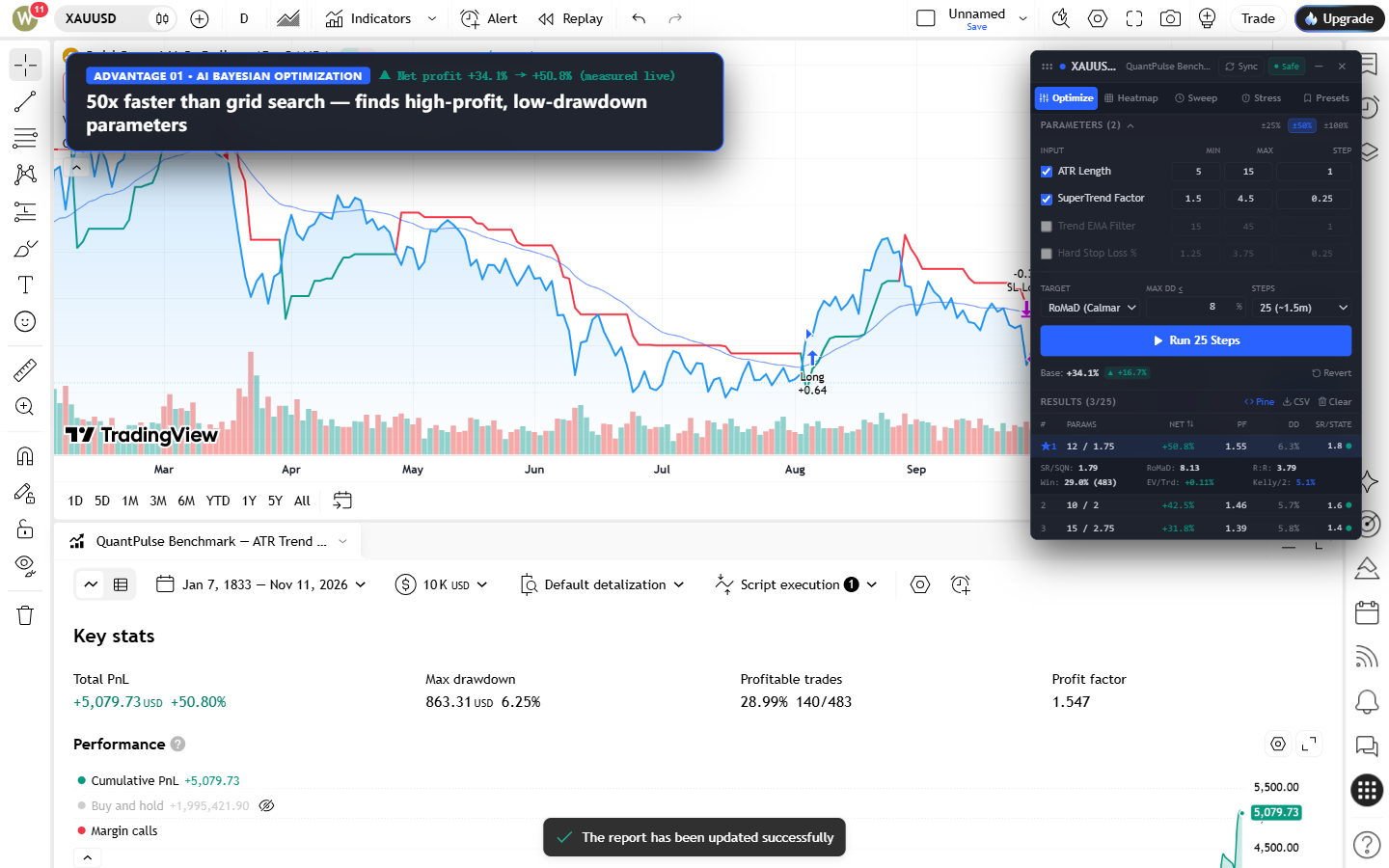
Replaces thousands of manual slider adjustments with Latin Hypercube Sampling (LHS) exploration followed by Gaussian Process Expected Improvement (GP-EI) convergence in ~25 steps.
RoMaD (Calmar), Profit Factor, or Net Profit.SR/SQN, RoMaD, R:R, Win Rate, Expectancy per trade, and Half-Kelly proxy.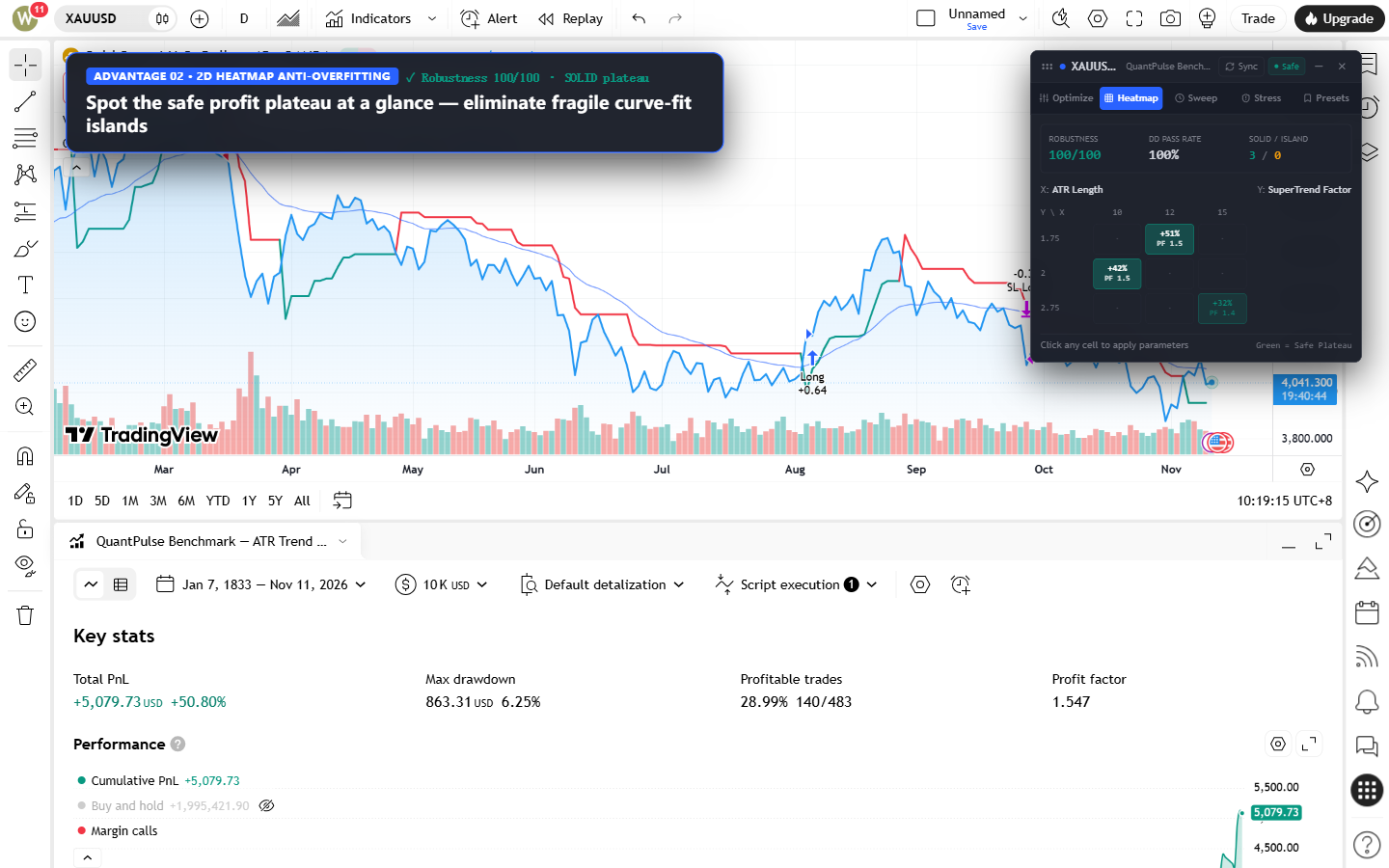
Isolated high-profit parameter spikes frequently collapse out-of-sample. QuantPulse maps adjacent X/Y parameter combinations to score neighborhood stability.
SOLID) from fragile single-cell spikes (ISLAND).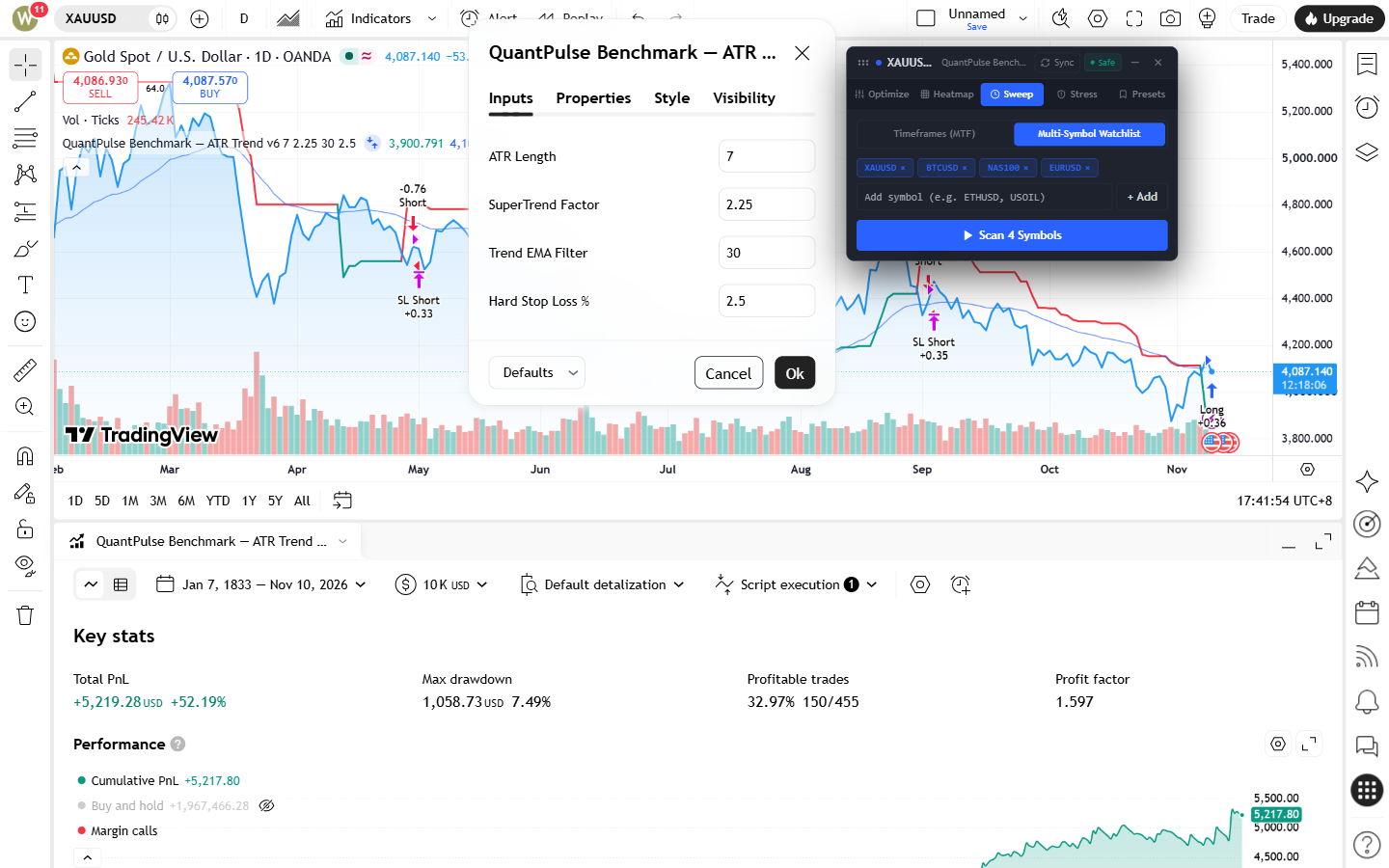
Verify whether your chosen parameter set generalizes across multiple chart intervals and correlated instruments without manually re-entering settings.
XAUUSD, BTCUSD, NAS100, EURUSD).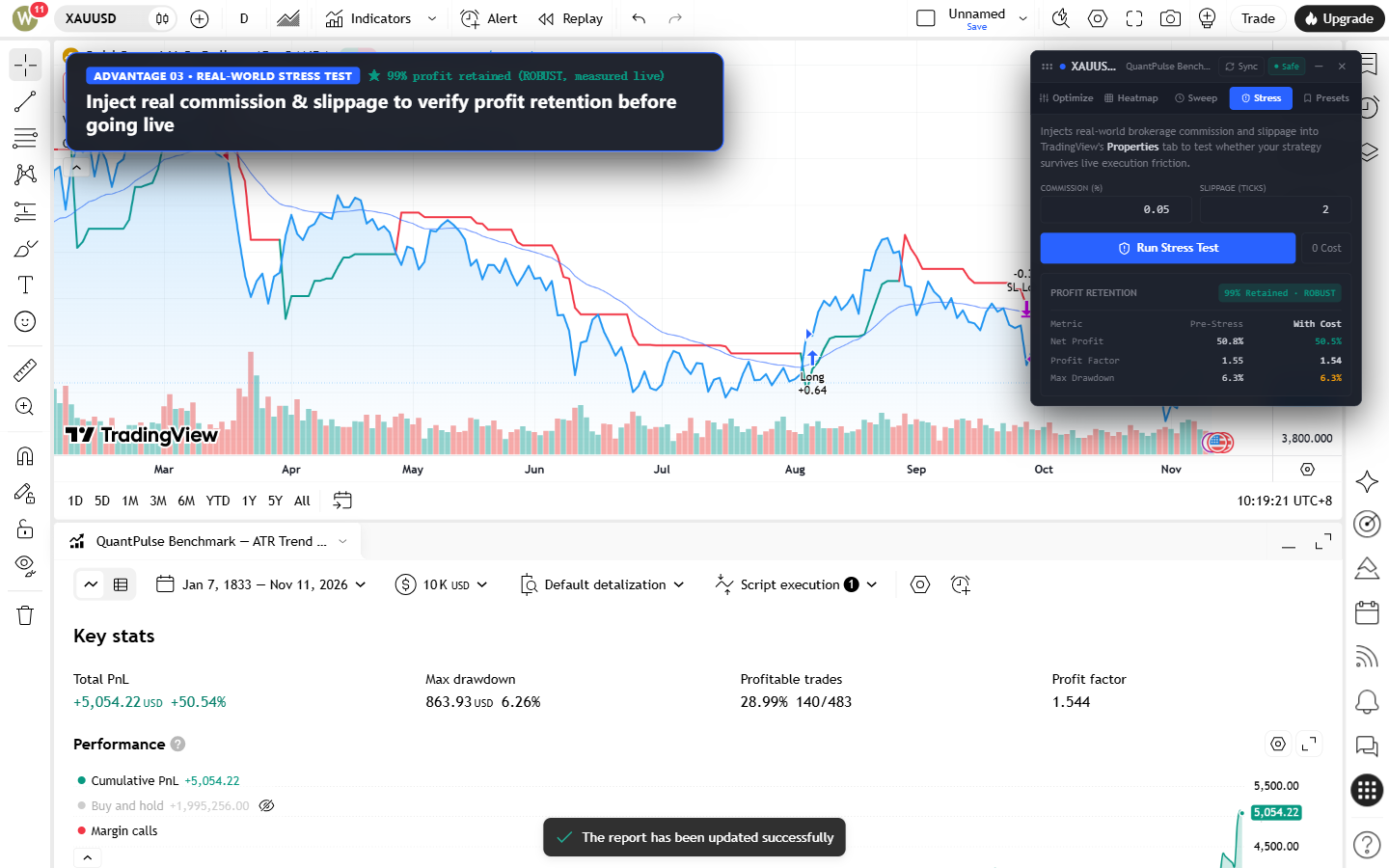
Zero-commission backtests often mask fragile scalping rules. QuantPulse injects elevated brokerage commission (%) and adverse slippage (ticks) directly into TradingView's Properties tab.
ROBUST, SENSITIVE, or FRAGILE based on retained profit %.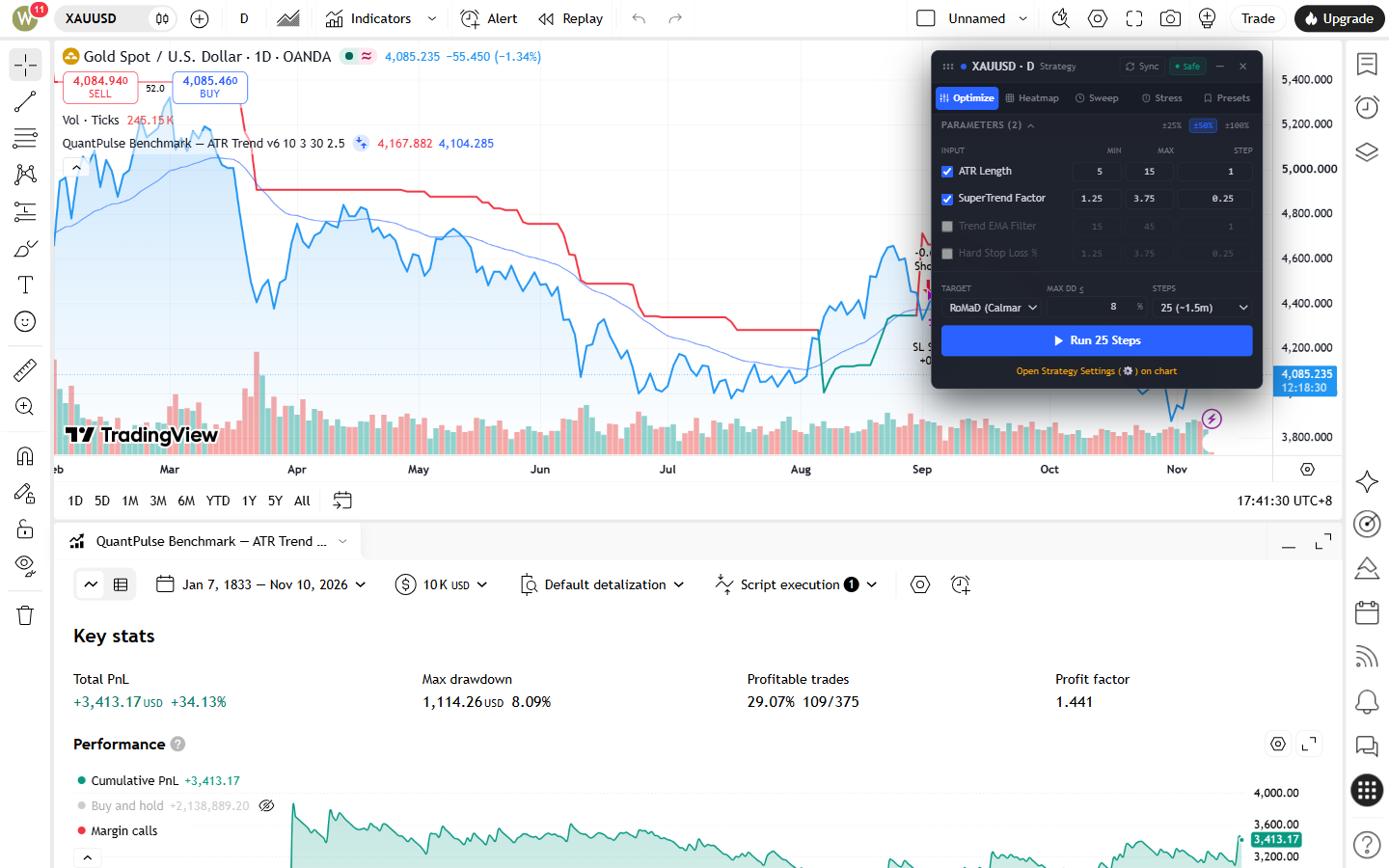
Auto-detects numeric strategy inputs with instant ±25%, ±50%, and ±100% search bounds, saves local presets, and exports ready-to-paste Pine Script v6 code.
input.int / input.float parameter lines with benchmark KPI header comments.Replaces brute-force grid search with Latin Hypercube Sampling and Gaussian Process Expected Improvement (~25-step convergence), complete with Prop Firm Max Drawdown filtering and RoMaD scoring.
Evaluates adjacent parameter neighborhoods to separate broad, repeatable Robust Plateaus from isolated single-point Curve-Fit Islands before locking inputs.
Runs automated cross-timeframe and cross-symbol watchlist sweeps, generating a pass/fail drawdown matrix so you can inspect parameter generalization across market regimes.
Stress-tests strategies under realistic brokerage fees and adverse tick slippage directly inside TradingView Properties, plus automatic alerts for Heikin Ashi / Renko / non-standard charts.
Generates copy-ready Pine Script v6 input.* parameter definitions and CSV reports, executes parameter changes at randomized human-paced intervals (2.2s–4.8s Weibull jitter + periodic pauses) with dual-track DOM selector self-healing, and keeps 100% of your Pine Script source code and backtest logs strictly local in Chrome (chrome.storage & IndexedDB).
Once your Bayesian run and Plateau Heatmap confirm a stable parameter zone, copy formatted input.int / input.float defaults straight into your Pine Script v6 editor, or save named parameter presets locally in IndexedDB.
±25%, ±50%, and ±100% search range expansion// === QuantPulse Optimized Inputs (XAUUSD · 1D) === // Net Profit: +50.80% | PF: 1.55 | Max DD: 6.25% | SR/SQN: 1.79 atrLength = input.int(12, "ATR Length") superTrendFactor = input.float(1.75, "SuperTrend Factor") trendEmaFilter = input.int(30, "Trend EMA Filter") hardStopLoss = input.float(2.5, "Hard Stop Loss %")
No cloud terminal, no brokerage API keys, and no code uploads. Everything runs inside your open TradingView tab.
Install the Chrome extension (Manifest V3), open any TradingView chart with a Pine Script strategy loaded, and click the QuantPulse toolbar icon.
Click Sync or open your Strategy Settings (⚙) dialog. QuantPulse reads numeric input fields locally and lets you set min/max/step ranges.
Run a 25-step Bayesian RoMaD search with your Max DD cap, check the 2D Plateau Heatmap, run MTF/Symbol Sweeps, and verify Brokerage Stress retention.
Apply the winning parameter set back to your TradingView chart in one click, export the full run to CSV, or copy Pine Script v6 input code.
Every paid tier includes instant Creem License Key delivery via email & checkout confirmation and up to 3 Chrome browser/device activations per key.
Starts automatically inside the Chrome extension. No credit card required to test compatibility.
wydongcn@gmail.com)Instant Creem License Key delivery via email & checkout confirmation · Up to 3 Chrome browser/device activations per key.
Instant Creem License Key delivery via email & checkout confirmation · Up to 3 Chrome browser/device activations per key.
wydongcn@gmail.com)Instant Creem License Key delivery via email & checkout confirmation · Up to 3 Chrome browser/device activations per key.
QuantPulse AI is built for Pine Script strategy authors and systematic researchers who want faster, more disciplined backtest workflows inside TradingView.
Historical backtest simulations—even when validated by plateau heatmaps and friction stress tests—do not predict or guarantee future market performance. Trading involves substantial risk of loss.
Review full terms in our Privacy Policy and Terms of Service & Refund Policy.
chrome.storage and IndexedDB. Only minimal license/trial checks (anonymous deviceId + licenseKey) and optional sanitized DOM structural skeletons (<1.5KB HTML tag structure when TradingView updates its UI selectors) communicate with our Cloudflare Worker edge service. See our Privacy Policy for complete details.
tradingview.com/chart with a Pine Script strategy applied, then click the QuantPulse icon.